Switching Strength and Conditioning Platforms with BridgeAthletic
Available in:
EN
Changing centralized coaching platforms has traditionally required significant time and effort. Programs need to be rebuilt, athletes onboarded and workflows re-established, often creating unnecessary disruption to training delivery.
For practitioners managing established programming systems and large athlete rosters, migrating programs and athlete profiles can be a significant barrier to making the transition. This is particularly relevant for practitioners managing training at scale, including facility owners, personal trainers and strength and conditioning coaches.
For practitioners managing established programming systems and large athlete rosters, migrating programs and athlete profiles can be a significant barrier…
BridgeAthletic offers built-in workflows designed to reduce the time and administrative burden associated with switching platforms. These include features such as:
These features can simplify the transition between platforms while allowing practitioners to maintain continuity across programming, athlete management and business operations.
Import Existing Programs with AI
Manually rebuilding years of programming can be one reason many practitioners stick with their existing prescription platforms. BridgeAthletic offers AI-assisted workflows that practitioners can use to reduce this administrative burden and simplify the process of transferring existing programs.
Import with AI converts existing training programs into structured, editable programs within BridgeAthletic. Rather than manually recreating exercises, sets, repetitions and coaching notes, practitioners can use their existing programming as a reference to create new training programs in BridgeAthletic.
Rather than manually recreating exercises, sets, repetitions and coaching notes, practitioners can use their existing programming…to create new training programs in BridgeAthletic.
Practitioners can upload programs in the formats they already use:
- Spreadsheets
- PDFs
- Images of a whiteboard
- Handwritten sheets
- Text pasted from notes
- Screenshots from other training platforms
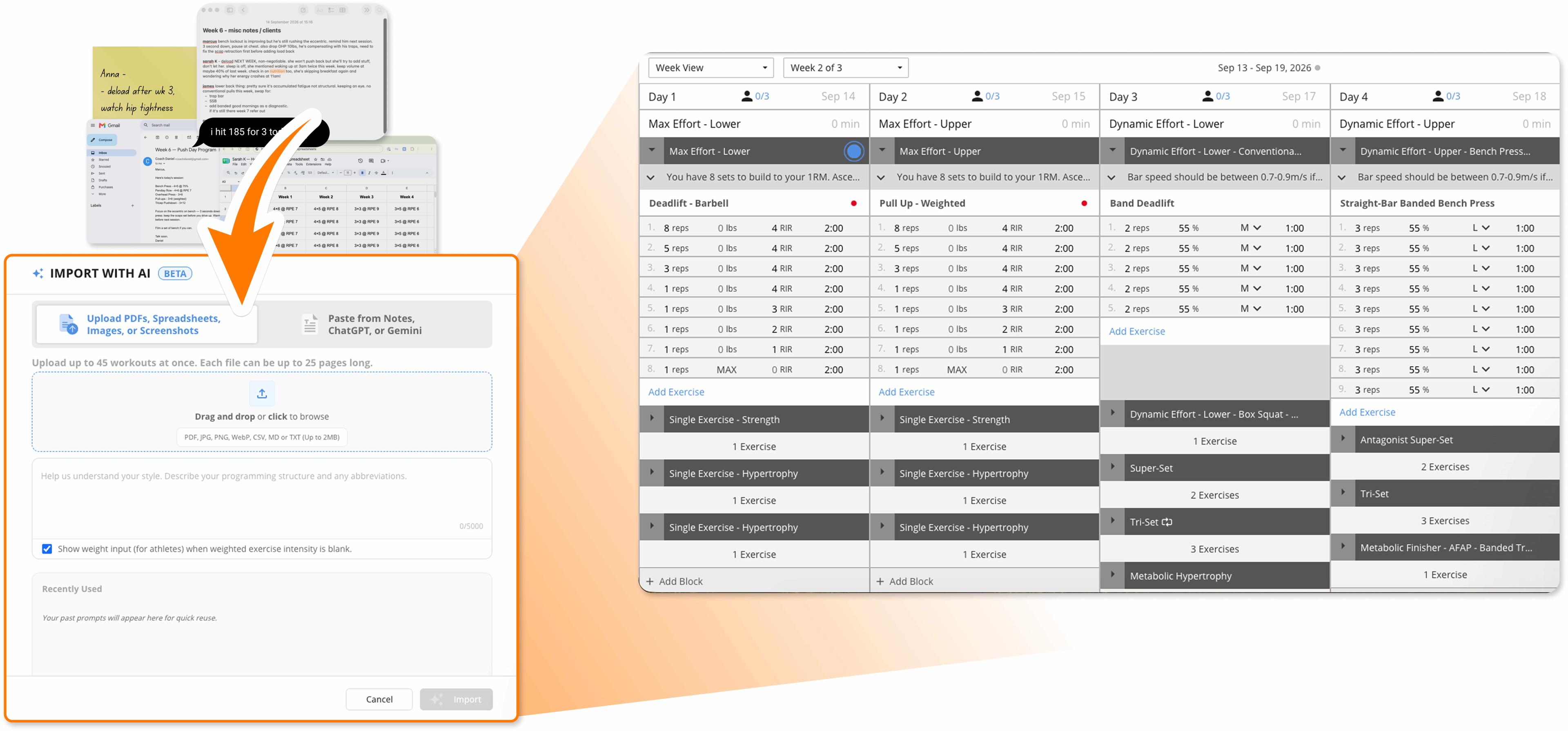
BridgeAthletic’s Import with AI transforming uploaded files into structured training programs.
Programs can include up to 45 workouts, with multiple uploads contributing to the same program. This enables practitioners to import individual workouts, add new training phases or progressively build complete multi-month plans.
Once uploaded, exercises are matched to BridgeAthletic’s library of more than 3,000 movements, after which up to three parameters, such as repetitions, tempo, weight or velocity, can be assigned to each exercise. Notes associated with exercises and blocks can also be transferred, helping retain the structure and context of the original program.
Once uploaded, exercises are matched to BridgeAthletic’s library of more than 3,000 movements…and [program notes] can also be transferred, helping retain the structure and context of the original program.
If an uploaded movement is not available in BridgeAthletic, practitioners can add, replace or skip it before finalizing the program. Practitioners can then review the completed import in Week View or Load Progression View, where they can adjust loads, prescriptions or other program details before assigning it to athletes. This allows existing training methodology and program structure to be maintained while reducing the manual workload associated with switching platforms.
Get Athletes Training the Same Day
Efficient athlete onboarding is key to maintaining training delivery when switching prescription platforms. BridgeAthletic provides multiple ways to add athletes and clients, so practitioners can choose the approach that best suits their training environment.
| Setting | How Athletes Join BridgeAthletic |
| In Person |
Athletes can scan a QR code to join and open their assigned program before the session starts. |
| Remote or Group | Practitioners can send a program URL directly to an athlete or group. |
| Full Roster | Athletes are uploaded in bulk from a CSV and assigned individual or group programs. |
| One-on-One Coaching |
Practitioners can send an email invitation to join a program when writing an individualized program for each athlete. |
Once athletes are added, their historical training data can be uploaded into the platform, allowing previous results and exercise comments to carry over into their training profile. For example, practitioners can upload one-repetition maximum (1RM) test results, which can then inform training loads based on each athlete’s 1RM and other percentage-based parameters.
Once athletes are added, their historical training data can be uploaded into the platform, allowing previous results and exercise comments to carry over into their training profile.
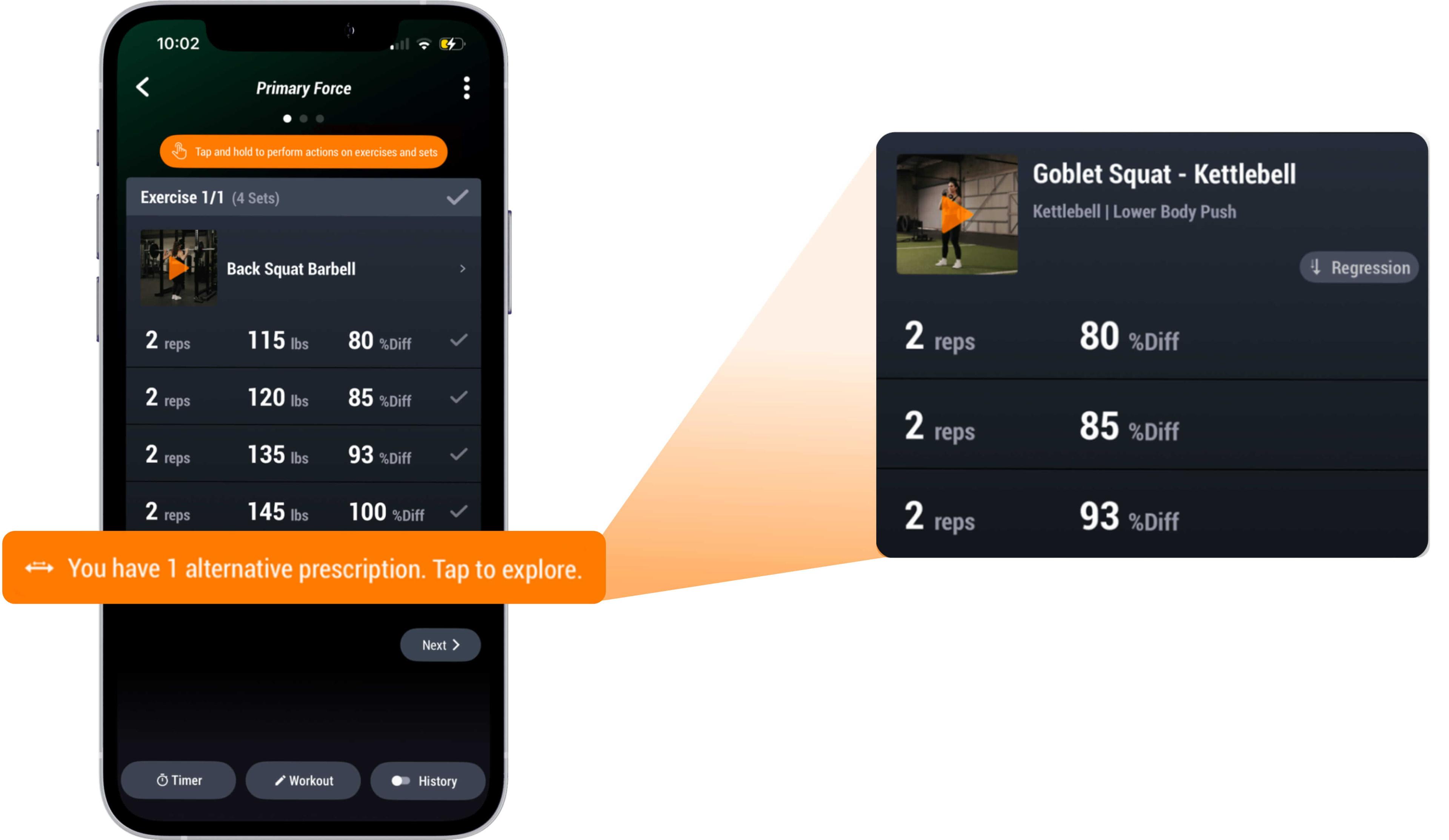
This historical data remains accessible to athletes through the BridgeAthletic app, providing context alongside their current training. Similarly, for athletes who are still learning new movements or progressing to more difficult tasks, alternative exercises can be added to a program to ensure they continue training without disruptions.
Keep the Business Running
For private facilities and independent coaches, a platform change must also account for the revenue behind the training. Features such as Business Hub, enabled by Stripe, let practitioners monitor payments, track program sales and automate subscriptions.
Business Hub also provides a centralized view of business activity, allowing practitioners to track active subscriptions, recent transactions and overall revenue from the same dashboard. This gives practitioners and facility operators visibility into both athlete training and the commercial side of their business without relying on separate systems to monitor payments and subscription activity.
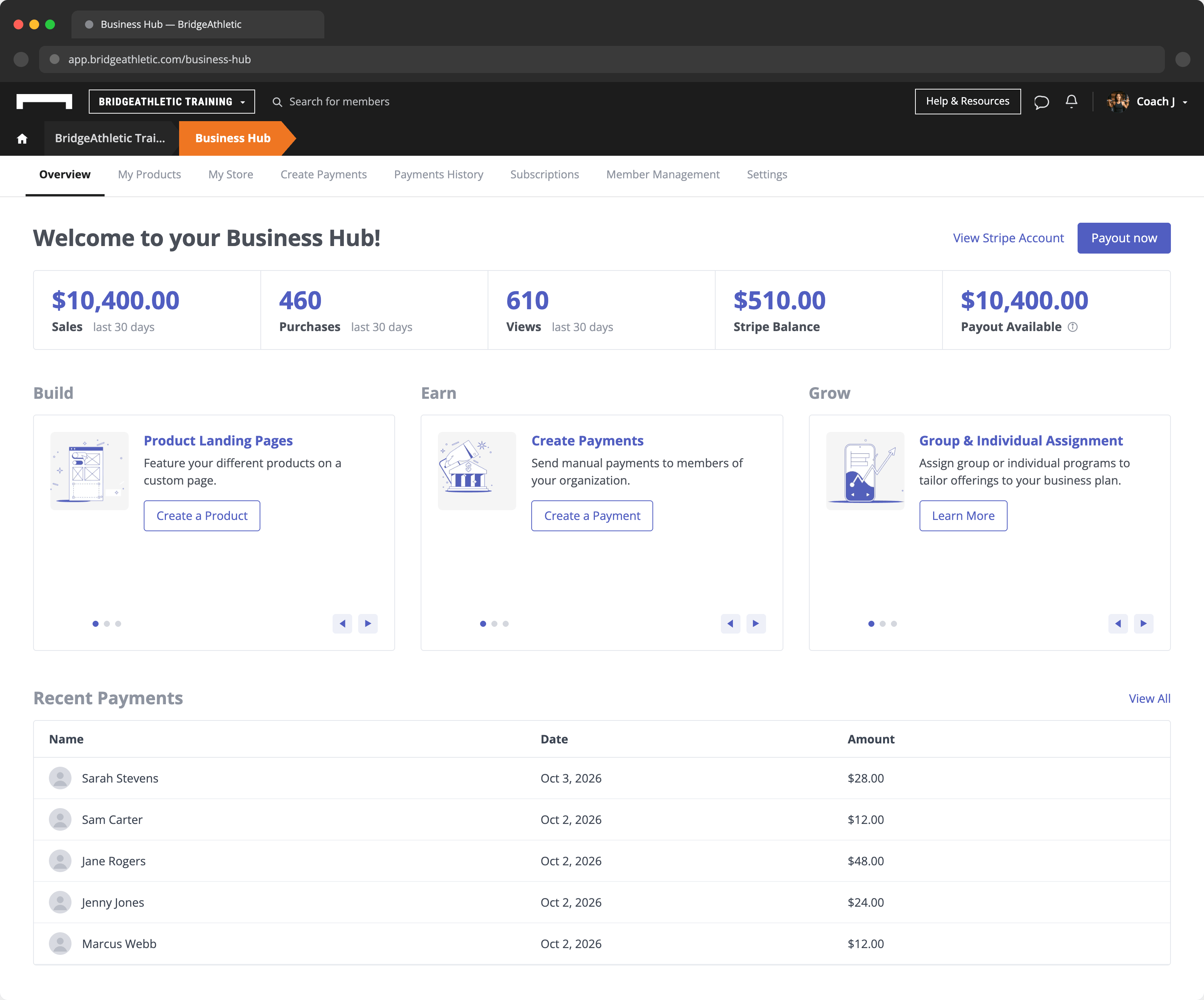
Business Hub…[allows] practitioners to track active subscriptions, recent transactions and overall revenue from the same dashboard.
Athletes can join BridgeAthletic and start a subscription or complete a payment by following a link to the created product or program. The coach can then view payment funds in the Business Hub and transfer them to a linked account, with BridgeAthletic taking zero commission. The only cost is the standard Stripe processing fee.
When athletes purchase products with linked programs, they are automatically assigned to their respective programs, so training can start without any additional assignment steps or added overhead for practitioners.
Programming Beyond the Migration
For many practitioners, switching platforms typically involves challenges with data migration, program changes and potential cash flow disruptions. However, features such as Import with AI, Program Invitations and Business Hub help practitioners overcome these challenges by making data migration simpler and more efficient.
Once established, practitioners can use the broader BridgeAthletic platform to manage programming, athlete engagement and business operations within a more connected workflow.
To learn more about how BridgeAthletic can help you migrate your existing programs and make the most of the platform, get in touch with our team.
